<?xml version="1.0" encoding="utf-8"?><feed xmlns="http://www.w3.org/2005/Atom" ><generator uri="https://jekyllrb.com/" version="4.3.4">Jekyll</generator><link href="/feed.xml" rel="self" type="application/atom+xml" /><link href="/" rel="alternate" type="text/html" /><updated>2026-01-19T17:10:31+00:00</updated><id>/feed.xml</id><title type="html">Daniel Feichtinger</title><subtitle>Daniel Feichtinger&apos;s Homepage</subtitle><entry><title type="html">Executing Code on the Client with HyperMap — Conference Recap</title><link href="/nordic-summit-2023-conference-recap/" rel="alternate" type="text/html" title="Executing Code on the Client with HyperMap — Conference Recap" /><published>2025-06-25T00:00:00+00:00</published><updated>2025-06-25T00:00:00+00:00</updated><id>/nordic-summit-2023-conference-recap</id><content type="html" xml:base="/nordic-summit-2023-conference-recap/"><![CDATA[<p>My first — and so far, only — talk on HyperMap was the 2023 Nordic
APIs Summit. The conference was for generalist API industry practitioners so I
tried to focus on the high-level business value of HyperMap. On reflection the
focus of the talk was a little confused between the potential for HyperMap to
make APIs a lot more powerful and its ability to speed up integration. Both are
true, but the integration speed angle ran headlong into the messaging of the
growing AI assistant space in the following months. Still, I’m pretty pleased
with what I managed to pack into twenty minutes!</p>

<iframe src="https://www.youtube.com/embed/gZvaginNdRU?si=SLKtJiGi7n0Z1CPJ" title="YouTube video player" frameborder="0" allow="accelerometer; autoplay; clipboard-write; encrypted-media; gyroscope; picture-in-picture; web-share" allowfullscreen="">
</iframe>

<p>I’ve updated the code in the slides to the soon-to-be-released interfaces:</p>

<iframe src="https://docs.google.com/presentation/d/e/2PACX-1vQYi6x5DESBhqeqrPCDzCAN1iWHz0c-SMNUAUlP6OWEcQczU5FdvCpEBbr7dnqNRBc5v7KXwrMo2D4W/pubembed?start=false&amp;loop=false&amp;delayms=3000" frameborder="0" allowfullscreen="true" mozallowfullscreen="true" webkitallowfullscreen="true">
</iframe>]]></content><author><name></name></author><summary type="html"><![CDATA[My first — and so far, only — talk on HyperMap was the 2023 Nordic APIs Summit. The conference was for generalist API industry practitioners so I tried to focus on the high-level business value of HyperMap. On reflection the focus of the talk was a little confused between the potential for HyperMap to make APIs a lot more powerful and its ability to speed up integration. Both are true, but the integration speed angle ran headlong into the messaging of the growing AI assistant space in the following months. Still, I’m pretty pleased with what I managed to pack into twenty minutes!]]></summary></entry><entry><title type="html">Introducing the HyperMap Stack</title><link href="/hypermap-stack-intro/" rel="alternate" type="text/html" title="Introducing the HyperMap Stack" /><published>2025-06-22T00:00:00+00:00</published><updated>2025-06-22T00:00:00+00:00</updated><id>/hypermap-stack-intro</id><content type="html" xml:base="/hypermap-stack-intro/"><![CDATA[<p><a href="https://www.allpurposemachines.com/rest/">HyperMap</a> is a new format for REST APIs I designed over the past couple
of years. It’s built around two core ideas. First, it’s entirely
self-descriptive, meaning a client can understand and interact with any HyperMap
API without custom integration code. Second, it supports running JavaScript or
WebAssembly in a secure sandbox on the client side, enabling dynamic
functionality that adapts to each API resource’s specific needs.</p>

<p>Think of it as taking the Web stack and stripping out everything designed for
humans—the document elements, styling, and visual components—then replacing them
with a minimalist, JSON data types (plus a binary type). I kept the familiar Web
event model and platform APIs which means that as clients interact with your
interface you can trigger dynamic behaviours, exactly as you’d expect from a
modern Web app.</p>

<p>A resource then becomes a living thing, dynamically updating based on client
interactions or remote events. Clients are now reactive; binding to parts of the
data structure and watching for changes. And yes: as people have asked this is
still REST — you’re allowed to do this!</p>

<style>
  dl {
    font-family: monospace;
  }

  dd {
    padding-left: 1em;
  }

  .value {
    dt {
      float: left;
    }
    dd {
      font-weight: bold;
    }
  }
</style>

<dl>
	<dt>equitiesData:</dt>
	<dd>
		<div>
			<dl>
				<dt>acornComputersLtd:</dt>
				<dd>
					<div>
						<dl>
							<div class="value">
								<dt>ticker:</dt>
								<dd>
									ACRN
								</dd>
							</div>
							<div class="value">
								<dt>price:</dt>
								<dd class="dynamic">
									239.46
								</dd>
							</div>
							<dt>buy:</dt>
							<dd>
								<form>
									<div>
										<label for="quantity">quantity:</label>
										<input aria-label="Text field" value="" type="text" name="quantity" />
									</div>
									<button disabled="">Submit</button>
								</form>
							</dd>
						</dl>
					</div>
				</dd>
				<dt>sinclairResearchLtd:</dt>
				<dd>
					<div>
						<dl>
							<div class="value">
								<dt>ticker:</dt>
								<dd>
									SCLR
								</dd>
							</div>
							<div class="value">
								<dt>price:</dt>
								<dd class="dynamic">
									188.26
								</dd>
							</div>
							<dt>buy:</dt>
							<dd>
								<form>
									<div>
										<label for="quantity">quantity:</label>
										<input aria-label="Text field" value="" type="text" name="quantity" />
									</div>
									<button disabled="">Submit</button>
								</form>
							</dd>
						</dl>
					</div>
				</dd>
			</dl>
		</div>
	</dd>
</dl>

<script>
	setInterval(() => {
		const prices = document.getElementsByClassName("dynamic");
		for (const price of prices) {
			const oldPrice = parseFloat(price.innerHTML);
			const newPrice = oldPrice + (Math.random() * 10) - 5;
			price.innerHTML = newPrice.toFixed(2);
		};
	}, 1000);
</script>

<p><em>An example of a HyperMap explorer inspecting live data, rendering controls
as UI elements. You might need to view the post in a browser.</em></p>

<p>So how do you call HyperMap APIs from your preferred language? Isn’t it a lot of
work to write a sandboxed code execution environment for all of your APIs? Turns
out you don’t need to: Mech is a universal client that can talk to any HyperMap
service, very similar to a Web browser but designed to be used by other software
rather than humans. Instead of writing your own client libraries or using an
SDK generator, just use Mech. What if there’s some behaviour you need that’s
not available out of the box? Just write some code and serve it from a URL
alongside your resource! Now your resources and your client behaviours are
linked and can’t drift out of sync.</p>

<p>I first released a prototype back in 2023 and gave
<a href="https://www.youtube.com/embed/gZvaginNdRU?si=SLKtJiGi7n0Z1CPJ">a talk at Nordic APIs</a>
that September, but for most of 2024 it was on the back-burner due to some
implementation issues that I couldn’t see a way around. Over the past few months
I’ve been working on a complete rewrite that I’m confident puts the stack on a
surer footing. In the coming days I’ll release a shim that adds support for
HyperMap to Web browsers as well as an initial Mech implementation for
client-side JavaScript. On the roadmap are a tool to explore and debug HyperMap
services as well as native Mech for Posix-compatible desktops and servers, as
well as sandboxed Apple apps.</p>

<p>If this sounds interesting please follow along by
<a href="/feed.xml">subscribing to the RSS feed</a>.</p>]]></content><author><name></name></author><summary type="html"><![CDATA[HyperMap is a new format for REST APIs I designed over the past couple of years. It’s built around two core ideas. First, it’s entirely self-descriptive, meaning a client can understand and interact with any HyperMap API without custom integration code. Second, it supports running JavaScript or WebAssembly in a secure sandbox on the client side, enabling dynamic functionality that adapts to each API resource’s specific needs.]]></summary></entry><entry><title type="html">Happy 61st Birthday to the Intergalactic Computer Network — Now Let’s Finish Building It</title><link href="/icn/" rel="alternate" type="text/html" title="Happy 61st Birthday to the Intergalactic Computer Network — Now Let’s Finish Building It" /><published>2024-04-23T00:00:00+00:00</published><updated>2024-04-23T00:00:00+00:00</updated><id>/icn</id><content type="html" xml:base="/icn/"><![CDATA[<p>On April 23, 1963, <a href="https://worrydream.com/refs/Licklider_1963_-_Members_and_Affiliates_of_the_Intergalactic_Computer_Network.pdf">J.C.R. Licklider wrote a memo addressed
to the “Members and Affiliates of the Intergalactic Computer Network”</a>,
widely considered to be the genesis of ARPANET and by extension the
modern Internet. Except, the memo describes a lot more than just
“internetworking”. Licklider has a very clear vision of an online,
collaborative, malleable substrate for computing:</p>

<blockquote>
  <p>I want to retrieve a set of experimental data that is on a tape called
Listening Test. The data are called “experiment 3.” These data are basically
percentages for various signal-to-noise ratios. There are many such empirical
functions. The experiment had a matrix design, with several listeners, several
modes of presentation, several signal frequencies, and several durations. I
want, first, to fit some “theoretical” curves to the measured data. I want to
do this in a preliminary way to find out what basic function I want to choose
for the theoretical relation between percentage and signal-to-noise ratio. On
another tape, called “Curve Fitting,” I have some routines that fit straight
lines, power functions, and cumulative normal curves. But, I want to try some
others, also. Let me try, at the beginning, the functions for which I have
programs. The trouble is, I do not have a good grid-plotting program. I want
to borrow one. Simple, rectangular coordinates will do, but I would like to
specify how many divisions of each scale there should be and what the labels
should be. I want to put that information in through my typewriter. Is there a
suitable grid-plotting program anywhere in the system? Using prevailing
network doctrine, I interrogate first the local facility, and then other
centers. Let us suppose that I am working at SDC, and that I find a program
that looks suitable on a disc file in Berkeley. My programs were written in
JOVIAL.</p>

  <p>The programs I have located through the system were written in FORTRAN. I
would like to bring them in as relocatable binary programs and, using them as
subroutines, from my curve-fitting programs, either at “bring-in time” or at
“run-time.”</p>

  <p>Supposing that I am able to accomplish the steps just described, let us
proceed. I find that straight lines, cubics, quintics, etc., do not provide
good fits to the data. The best fits look bad when I view them on the
oscilloscope.</p>

  <p>The fits of the measured data to the cumulative normal curve are not
prohibitively bad. I am more interested in finding a basic function that I can
control appropriately with a few perimeters than I am in making contact with
any particular theory about the detection process, so I want to find out
merely whether anyone in the system has any curve-fitting programs that will
accept functions supplied by the user or that happen to have built-in
functions roughly like the cumulative normal curve, but asymmetrical. Let us
suppose that I interrogate the various files, or perhaps interrogate a
master-integrated, network file, and find out that no such programs exist. I
decide, therefore, to go along with the normal curve.</p>

  <p>At this point, I have to do some programming. I want to hold on to my data, to
the programs for normal curve fitting, and to display programs that I
borrowed. What I want to do is to fit cumulative normal curves to my various
sub-sets of data constraining the mean and the variance to change slowly as I
proceed along any of the ordinal or ratio- scale dimensions of my experiment,
and permitting slightly different sets of perimeters for the various subjects.
So, what I want to do next is to create a kind of master program to set
perimeter values for the curve-fitting routines, and to display both the
graphical fits and the numerical measures of goodness to fit as, with
light-pen and graphics of perimeters versus independent variables on the
oscilloscope screen, I set up and try out various (to me) reasonable
configurations. Let us say that I try to program repeatedly on my actual data,
with the subordinate programs already mentioned, until I get the thing to
work.</p>

  <p>Let us suppose that I finally do succeed, that I get some reasonable results,
photograph the graphs showing both the empirical data and the “theoretical”
curves, and retain for future use the new programs. I want to make a system of
the whole set of programs and store it away under the name
“Constrained-perimeter Normal-curve-fitting System.”</p>

  <p>…</p>

  <p>In the foregoing, I must have exercised several network features. I engaged in
information retrieval through some kind of system that looked for programs to
meet certain requirements I had in mind. Presumably, this was a system based
upon descriptors, or reasonable facsimiles thereof, and not in the near
future, upon computer appreciation of natural language. However, it would be
pleasant to use some of the capabilities of avant-garde linguistics. In using
the borrowed programs, I effected some linkages between my programs and the
borrowed ones. Hopefully, I did this without much effort –- hopefully, the
linkages were set up–or the basis for making them was set up–when the programs
were brought into the part of the system that I was using. I did not
borrow any data, but that was only because I was working on experimental data
of my own. If I had been trying to test some kind of a theory, I would have
wanted to borrow data as well as programs.</p>

  <p>When the computer operated the programs for me, I suppose that the activity
took place in the computer at SDC, which is where we have been assuming I was.
However, I would just as soon leave that on the level of inference. With a
sophisticated network-control system, I would not decide whether to send the
data and have them worked on by programs somewhere else, or bring in programs
and have them work on my data. I have no great objection to making that
decision, for a while at any rate, but, in principle, it seems better for the
computer, or the network, somehow, to do that.</p>
</blockquote>

<p>I find this a deeply compelling vision, even 61 years later! Online access to
data and applications, similar to the Web/cloud model we have today, but where
the applications (server-side as well as client-side) can be dynamically
modified to take advantage of new capabilities (no matter what language they
were originally built with). One where computation moves from a remote service
to your local machine depending on which is most suitable. And where
modifications can be easily published for others to discover and reuse.</p>

<p>Pieces of it certainly exist today, but not in a deep, systematic way. In fact,
while all the core technology was around in the 70s, to the best of my knowledge
no one has ever built a demo of this workflow. (<a href="mailto:daniel@allpurposemachines.com">I’d love to
hear</a> if anyone knows otherwise.)</p>

<p><a href="https://www.allpurposemachines.com/">HyperMap is a new spec for REST APIs</a> that
is self-descriptive and supports client-side code execution, two key
capabilities that I think make it one of the foundational rails for the
Intergalactic Computer Network. In the next few weeks I’ll release a HyperMap
powered demo of Licklider’s workflow. If you’d like to stay up to date follow
along on <a href="https://twitter.com/APMachines">Twitter</a> or in the
<a href="https://discord.gg/csYd9ZU6Ng">Discord</a>.</p>]]></content><author><name></name></author><summary type="html"><![CDATA[On April 23, 1963, J.C.R. Licklider wrote a memo addressed to the “Members and Affiliates of the Intergalactic Computer Network”, widely considered to be the genesis of ARPANET and by extension the modern Internet. Except, the memo describes a lot more than just “internetworking”. Licklider has a very clear vision of an online, collaborative, malleable substrate for computing:]]></summary></entry><entry><title type="html">Why Blockchain Will Lead to Centralisation</title><link href="/will-blockchain-lead-to-decentralisation/" rel="alternate" type="text/html" title="Why Blockchain Will Lead to Centralisation" /><published>2019-04-24T15:46:55+00:00</published><updated>2019-04-24T15:46:55+00:00</updated><id>/will-blockchain-lead-to-decentralisation</id><content type="html" xml:base="/will-blockchain-lead-to-decentralisation/"><![CDATA[<p>This blog is focussed on personal computing, but the artefacts we sit down and
use everyday are impacted by changes elsewhere in the tech ecosystem. I’ve spent
the last 5 years working in the blockchain space, and I think it’s maturing to
the point where we can start to see its impact on our computing environments.
<a href="https://twitter.com/auxilit/status/1085249679544053765">This post expands on a Twitter thread</a>.</p>

<p><em>Note that I use ‘blockchain’ throughout as an umbrella term for a lot of
interesting work on provable data structures, distributed protocols, smart
contracts, and the like. Early on, some of us tried to popularise ‘distributed
ledgers’ the umbrella term, but it doesn’t seem to have stuck. However, I still
see disagreements between people who are using the ‘blockchain-the-umbrella’ or
‘blockchain-the-data-structure’. So it goes…</em></p>

<p>I sometimes see an argument along the lines of “blockchains were designed to
decentralise technology, but if we’re not careful big organisations will use it
to centralise even more”. I don’t think this is quite right: in my opinion
blockchain technology will increase both centralisation and decentralisation at
the same time.</p>

<p>I think this is actually true of all communications technology as it drops
transaction costs. Roy Bahat has a
<a href="https://wtfeconomy.com/the-corporation-is-dead-long-live-the-corporation-13b787e33b29">really interesting article</a>
pointing out that companies in the US are getting both bigger and smaller since
the turn of the century. The average company is smaller (especially when you
only measure those under 500), but take an employed person at random and they’re
likely to work at a larger organisation. It’s polarisation — there are more
small companies than before, but the big ones are a lot, lot bigger. As Roy puts
it:</p>

<blockquote>
  <p>As those transaction costs go down — reputations are shared online, so people
trust each other, marketplaces help you find ever-more granular business
services, communication becomes free — the corporation could disassemble into
its components, with one small firm (or even a person) doing each task and
coordinating with others. The trick is that those same falling transaction
costs can also make it easier to do business within a company, too (Intranets
instead of employee manuals, Slack instead of a phone tree, etc.) — which
might make some companies bigger as they’re capable of managing bigger staffs.</p>
</blockquote>

<p>I think looking at the impact of blockchain with that in mind is valuable. The
first question is decentralising what exactly?
<a href="https://twitter.com/swardley">Simon Wardley</a> recently pointed out to me
that decentralisation of infrastructure can happen independently of
decentralisation of power: if Amazon launch delivery drones, it may be
decentralised in terms of each drone acting on its own local knowledge and
goals, yet the fleet as a whole is owned by Amazon for its profit. I personally
believe the decentralisation of infrastructure is somewhat inevitable: the more
interesting question is the decentralization of power.</p>

<p>As I see it, in the decentralisation of power camp there are some really
interesting strands of work going on in the around incentivising coordinated
behaviour (e.g.
<a href="https://en.wikipedia.org/wiki/Mechanism_design">mechanism design</a>) and
community governance (e.g.
<a href="https://en.wikipedia.org/wiki/Elinor_Ostrom">Elinor Ostrom’s work</a>). With
suitable technology behind them — for example, encoding governance in smart
contracts — future decentralised communities will act with a purpose and
coherence that previously was only achievable by the best organisations.</p>

<p>At the other end, I think the super-organisations of tomorrow are going to look
very different from those of today. I think they’ll be open platforms supporting
large ecosystems, with a hazy line between the core organisation and the
partners and customers around it.
<a href="https://blog.gardeviance.org/2013/01/ecosystems.html">Simon Wardley has sometimes referred to the process of ‘gardening’</a>,
which I think is apt — tending a platform ecosystem like planting, weeding, and
watering. Key is that these platforms will be enabled by exactly the same
technology that underpins the decentralised platforms: the only difference will
be the power structures behind them.</p>

<p>A question remains: which industries, companies, or use cases will end up being
decentralised and which centralised? I don’t think it’s as easy as saying all
large organisations will get larger. It’s likely that certain problems will be
better suiter to one model or the other. My guess is that organisations will
need to keep moving up the value chain as that anything that looks like it
should be common infrastructure will be targeted by decentralised communities.</p>

<p>The really interesting thing is when you step back and look at this polarisation
as a user — it might not really be possible to tell one end from the other. The
large decentalised efforts will have sophisticated incentive alignments and
governance (and branding), and the super-organisations will be amorphous and
fluid. I’m sure there’ll be a lot of horizontal transfer of good ideas. There
are a few regulatory changes which give incorporated entities the edge for now
(e.g.
<a href="https://papers.ssrn.com/sol3/papers.cfm?abstract_id=3337861">corporations have coordination rights denied to non-corporations</a>)
but it’s possible for that to change in time. Perhaps it’s less two ends of a
spectrum and more like separate paths toward some unified future state. Should
be a fun ride…</p>]]></content><author><name></name></author><summary type="html"><![CDATA[This blog is focussed on personal computing, but the artefacts we sit down and use everyday are impacted by changes elsewhere in the tech ecosystem. I’ve spent the last 5 years working in the blockchain space, and I think it’s maturing to the point where we can start to see its impact on our computing environments. This post expands on a Twitter thread.]]></summary></entry><entry><title type="html">The Web Is Dead, Long Live the Web</title><link href="/the-web-is-dead-long-live-the-web/" rel="alternate" type="text/html" title="The Web Is Dead, Long Live the Web" /><published>2019-01-07T21:24:27+00:00</published><updated>2019-01-07T21:24:27+00:00</updated><id>/the-web-is-dead-long-live-the-web</id><content type="html" xml:base="/the-web-is-dead-long-live-the-web/"><![CDATA[<p>Last month saw the news that Microsoft was shifting
<a href="https://blogs.windows.com/windowsexperience/2018/12/06/microsoft-edge-making-the-web-better-through-more-open-source-collaboration/">Edge’s rendering engine from its proprietary one to Chromium</a>.
Opinion on Twitter seemed to be split between joy at Microsoft finally embracing
an open-source, standards compliant engine, or horror at the thought of browsers
becoming an anti-competitive monopoly controlled by Google — a repeat of the
dark days of IE6. It was certainly not great timing for a
<a href="https://blade.tencent.com/magellan/index_en.html">Chromium vulerability</a> (via
SQLite) to be dsicovered.</p>

<blockquote>
  <p>Sad to see Microsoft throw in the towel on their own browser rendering engine.
The web doesn’t benefit when developers are encouraged to “just test in
Chrome” through consolidation. We need a strong, diverse set of browsers. HANG
IN THERE FIREFOX! <a href="https://t.co/9DxIOPich3">https://t.co/9DxIOPich3</a> — DHH
(@dhh)
<a href="https://twitter.com/dhh/status/1070738372493078528?ref_src=twsrc%5Etfw">December 6, 2018</a></p>
</blockquote>

<blockquote>
  <p>A world with a single browser made by Google would be just as dangerous as the
world with one browser made by Microsoft was. Mozilla’s role in the world just
became even more crucial. — Laurie Voss 🏳️‍🌈🇹🇹🇺🇸🇬🇧 (@seldo)
<a href="https://twitter.com/seldo/status/1069984819096866816?ref_src=twsrc%5Etfw">December 4, 2018</a></p>
</blockquote>

<p>I’m certainly disappointed by this news, but I think that the reality is that
the Web has been stuck in a monoculture and it shows in the current Web
standards. This was
<a href="http://blog.mozilla.org/blog/2018/12/06/goodbye-edge/">Mozilla’s response</a>, and
I respect what Mozilla stands for, but when you look at the desktop browser
chrome there’s almost nothing to tell them apart. Tabs, an address bar (perhaps
combined with a search bar), bookmarks, and history. Interaction models are
largely identical, and have been since Firefox introduced tabbed browsing in
2002.</p>

<p><img src="__GHOST_URL__/content/images/2018/12/image4.png" alt="image4" /></p>

<p><img src="__GHOST_URL__/content/images/2018/12/image2.png" alt="image2" /></p>

<p><img src="__GHOST_URL__/content/images/2018/12/image1.png" alt="image1" /></p>

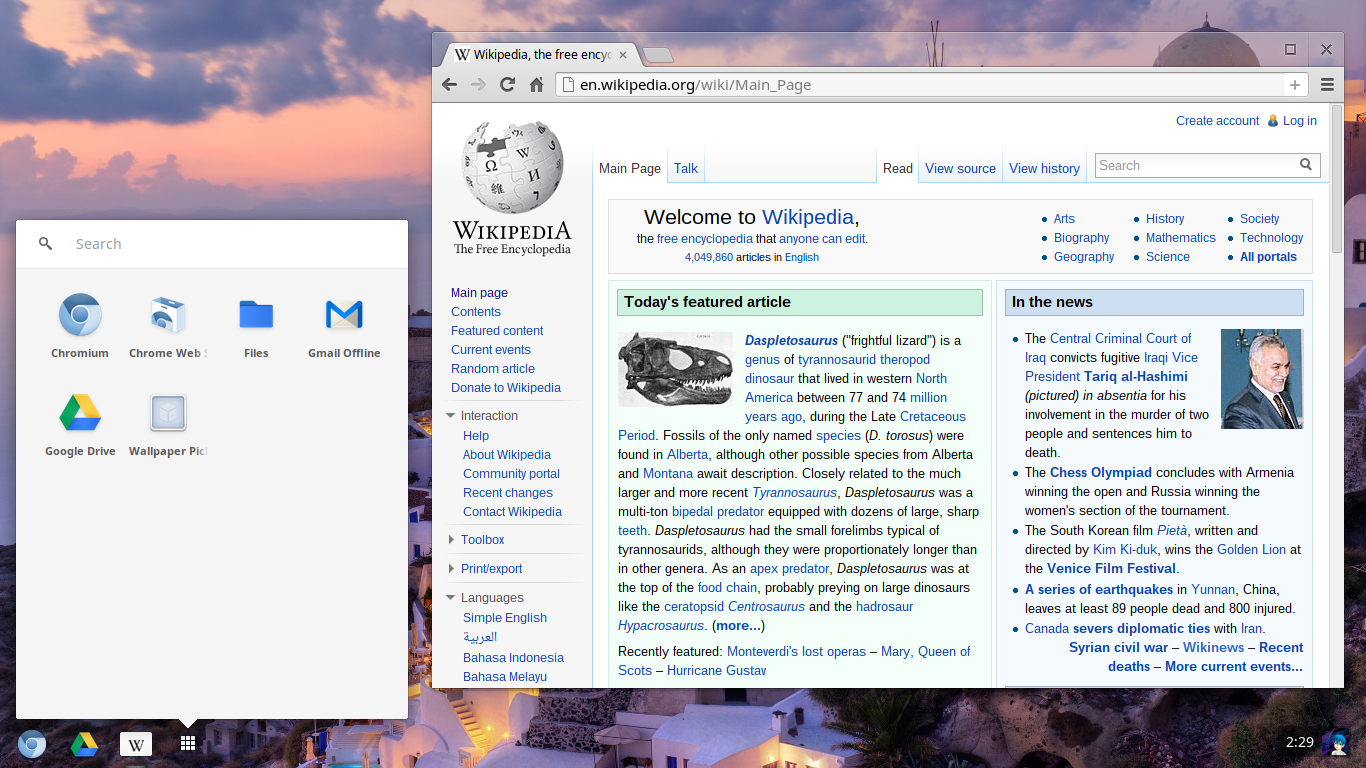
<p>Chrome OS, which had the opportunity to reimagine what a browser could look like
when given the whole environment to play with, chose instead to remain identical
to its “hosted” counterpart and instead recreate (or even expose with its new
containerized Linux) a limited version of a 90s operating system around it.</p>

<blockquote>
  <p>Chrome OS Linux apps will soon be able to access your entire Downloads folder
and Google Drive (all they need now are browser toolbars and DLLs and the
security story will be complete)
<a href="https://t.co/36QFiM9TbH">https://t.co/36QFiM9TbH</a> — Benedict Evans
(@benedictevans)
<a href="https://twitter.com/benedictevans/status/1063230472421920768?ref_src=twsrc%5Etfw">November 16, 2018</a></p>
</blockquote>

<p>You might argue that browser chrome is distinct from the engine underneath it
and that’s true to an extent, but Web clients and their place in a modern
computing environment determine what features should be standardized and
supported by the engines. If your notion is that a browser is just another
application that should be subservient to the machinery and affordances of the
host environment that its running in, you’ll favor standards that are familiar
over ones which are actually more native to the Web. The growing popularity of
Electron and calls for that functionality to be pulled back into the browser is
a particularly noticeable result.</p>

<p>However, the Web was always more radical than that. It had its own interaction
models around hypermedia, and was flexible in a way that current systems still
aren’t. User installed style sheets and scripts (keep going, Greasemonkey!), Web
feeds for users to consume information how they want (RIP browser feed managers)
or even combine and extend them (RIP Yahoo Pipes), the Semantic Web, warts and
all, and its vision of agents ranging over data sources, compiling custom views
on behalf of the user. All of it sidelined. Even the broad principle of ReST
architectures allowing loosely coupled, evolvable clients has evolved out into
something weaker — proprietary clients (either in-browser or native clients
using things like WKWebView) delivered with hard coded, versioned endpoints.
Instead of this grand vision, an identical set of browsers that vie to deliver
increasingly opaque “Web Applications” to the user with perfect fidelity.</p>

<p>My mental model is that the Web sat on the cusp between 2 peaks — one was the
90s desktop model, and the other is a Web-native, decentralized hypermedia peak,
not fully explored, yet has the potential to be much richer and more powerful.
In the early days it looked like the Web was rising off towards the higher peak
but instead, inevitably, it’s been dragged into the safe, well-explored one.</p>

<p>So this is why I think the Web is dead — it has lost its way. As long as the
current institutions are in charge of the browsers and the standards committees
its current path has fundamentally restricted how powerful the Web can be in the
future. And I don’t see a change in those institutions any time soon. The
standards are large and sprawling, and it requires a significant investment to
experiment in this space (not even Microsoft can compete) with little direct
finacial gain.</p>

<p>I see two paths out of this. One would be to radically simplify the whole Web
stack from the bottom-up. Allen Wirfs-Brock wrote a great post pointing out that
<a href="http://www.wirfs-brock.com/allen/posts/379">the Web app platform looks a lot like both a framework and an (unspecced) operating system kernel</a>.
Perhaps we can pull out and standardize that kernel, leaving some competition in
the framework part of the stack. This might overlap with the goals of
<a href="https://lively-kernel.org/">Lively Kernel</a>.</p>

<p><img src="__GHOST_URL__/content/images/2019/01/Screenshot-2019-01-03-at-19.03.50.png" alt="Screenshot-2019-01-03-at-19.03.50" /><br />
— <a href="https://www.youtube.com/watch?v=gGw09RZjQf8">Source</a></p>

<p>The other would be top-down: increase competition in the browser space.
Hopefully we’d stumble on powerful models for clients which take advantage of
the native properties of the Web, rather than fight against it. Even outside of
the engine, browsers are large, complex things, but perhaps we can modularize
and package them in interesting ways. I particularly like this take from Patrick
Walton talking about engines, but applied to browsers as a whole:</p>

<blockquote>
  <p>What if we thought of browser engines less as monolithic entities and more as
distros of the various libraries that comprise the Web platform? — Patrick
Walton (@pcwalton)
<a href="https://twitter.com/pcwalton/status/1080211656901255168?ref_src=twsrc%5Etfw">January 1, 2019</a></p>
</blockquote>

<p>So: the Web is dead, long live the Web.</p>]]></content><author><name></name></author><summary type="html"><![CDATA[Last month saw the news that Microsoft was shifting Edge’s rendering engine from its proprietary one to Chromium. Opinion on Twitter seemed to be split between joy at Microsoft finally embracing an open-source, standards compliant engine, or horror at the thought of browsers becoming an anti-competitive monopoly controlled by Google — a repeat of the dark days of IE6. It was certainly not great timing for a Chromium vulerability (via SQLite) to be dsicovered.]]></summary></entry><entry><title type="html">In conversation with Aza Raskin</title><link href="/in-conversation-with-aza-raskin/" rel="alternate" type="text/html" title="In conversation with Aza Raskin" /><published>2018-12-02T21:40:21+00:00</published><updated>2018-12-02T21:40:21+00:00</updated><id>/in-conversation-with-aza-raskin</id><content type="html" xml:base="/in-conversation-with-aza-raskin/"><![CDATA[<p>Many years ago I read
<a href="https://www.amazon.com/Humane-Interface-Directions-Designing-Interactive/dp/0201379376/ref=sr_1_1?ie=UTF8&amp;qid=1538964201&amp;sr=8-1&amp;keywords=the+humane+interface&amp;dpID=41wqicWUyDL&amp;preST=_SY291_BO1,204,203,200_QL40_&amp;dpSrc=srch">The Humane Interface</a>
by <a href="https://en.wikipedia.org/wiki/Jef_Raskin">Jef Raskin</a> which completely
upended my notion of computing. It showed a vision of a world of computing which
was radically different from the prevailing paradigms. Until then, I hadn’t even
realised that it was even possible to question core artefacts like files or
applications.</p>

<p>Jef lead a team to make that vision a reality in the form of
<a href="https://en.wikipedia.org/wiki/Archy">Archy</a>.</p>

<p>Archy never quite fulfilled its grand ambition, but its legacy continued in the
forms of Enso (a Windows-focused implementation), and then
<a href="https://en.wikipedia.org/wiki/Ubiquity_(Firefox)">Ubiquity (for Firefox)</a>.</p>

<p><a href="https://en.wikipedia.org/wiki/Aza_Raskin">Aza Raskin</a>, Jef’s son, was the
common thread between all of these projects. I recently
<a href="https://github.com/DanielFeichtinger/Archy">spent some time getting it up and running properly on modern Macs</a>
so I decided to chat with him to get some insight into this interesting chain of
projects.</p>

<h1 id="team-vision">Team, Vision</h1>

<p><strong>HC</strong>: I wanted to start with the genesis of Archy. At what point did it
coalesce and come together as a project?</p>

<p><strong>AR</strong>: It’s been so long that I have to sort of dredge through the murky, muddy
water of memory. So after Jef published his book,
<a href="https://www.amazon.com/Humane-Interface-Directions-Designing-Interactive/dp/0201379376/ref=sr_1_1?ie=UTF8&amp;qid=1538964201&amp;sr=8-1&amp;keywords=the+humane+interface&amp;dpID=41wqicWUyDL&amp;preST=_SY291_BO1,204,203,200_QL40_&amp;dpSrc=srch">The Humane Interface</a>,
there was a strong desire to take many of those concepts that Jef had continued
to work on around what are cognetics and the ergonomics of the mind and make a
utility product that really worked the way our minds did. Many of them had first
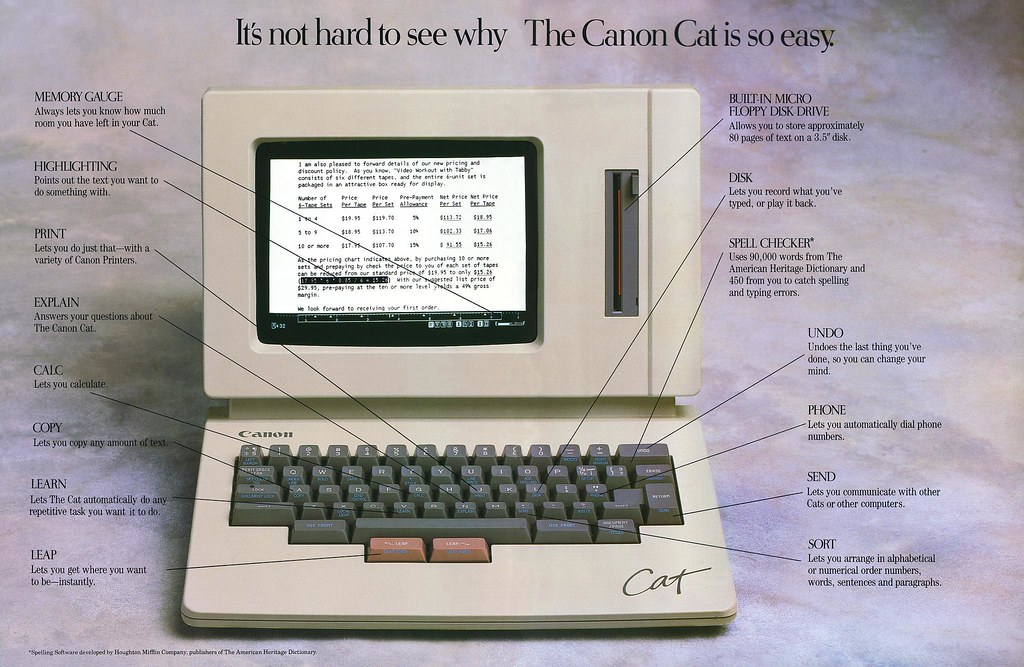
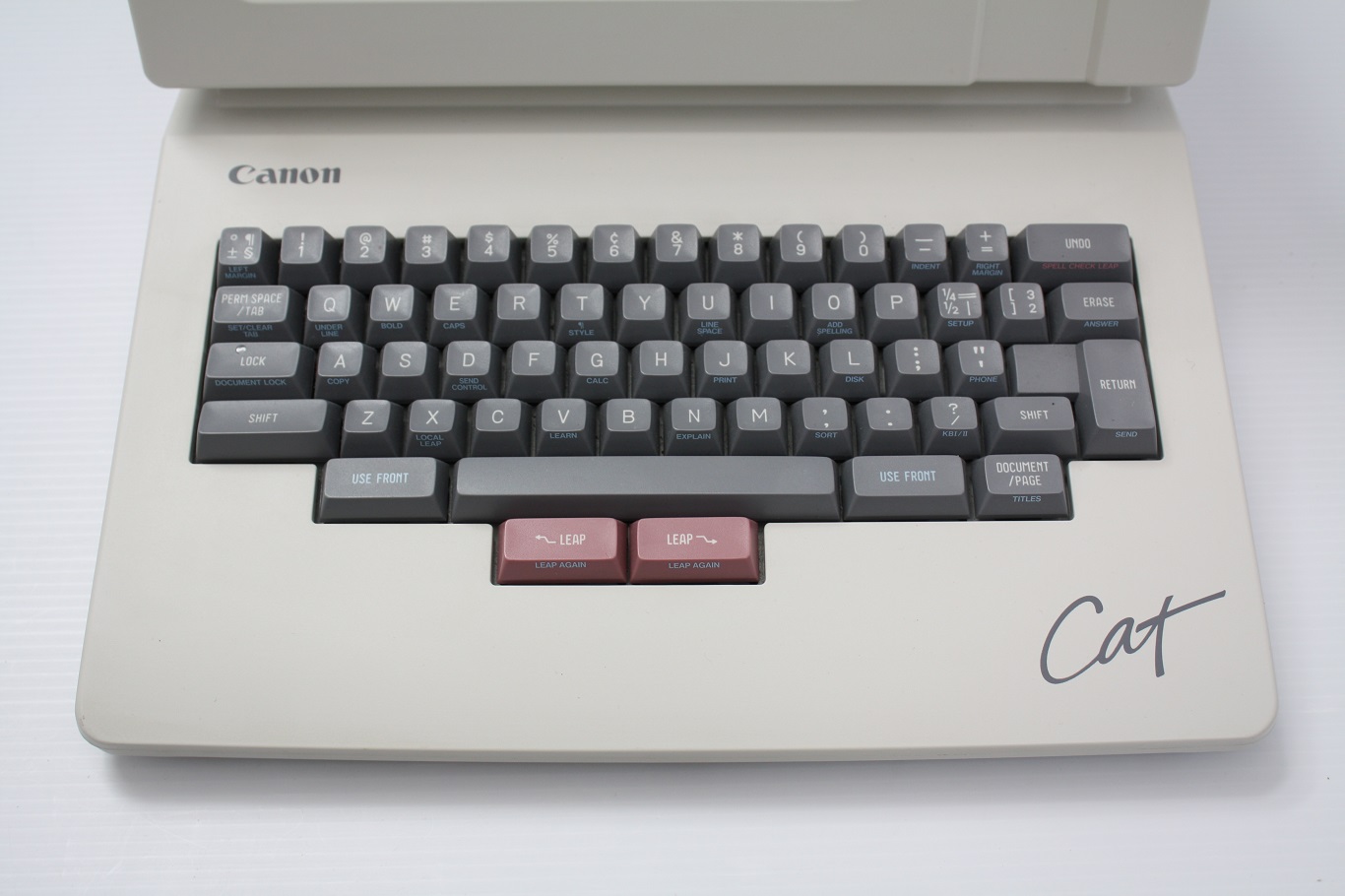
come to light in the <a href="https://en.wikipedia.org/wiki/Canon_Cat">Canon Cat</a> after
the Mac, before getting shut down by Canon when an electronic typewriter failed.
They had put the Canon Cat into the same conceptual bucket as an electronic
typewriter — just shows you what the thinking was like at that time. After
selling something like 20,000 units they shut it down.</p>

<p><a href="https://www.flickr.com/photos/mwichary/2184351381" title="Canon"><img src="https://farm3.staticflickr.com/2158/2184351381_272b92410f_b.jpg" alt="Canon" /></a>
– A scan of a Canon Cat advert by Marchin Wichary <a href="https://www.flickr.com/photos/mwichary/2184351381">(source)</a></p>

<p>Archy really got going in my junior year of college, so that was 2003 when we
started coding. We were working simultaneously on a contract for Samsung to
redesign their phones and were thinking of doing it in a zooming concept and
using that funding to fund the Raskin Centre for Humane Interfaces, RCHI, and
turn that into the be-all end-all text editor, and that became Archy.</p>

<p><strong>HC</strong>: Where did the team come from?</p>

<p><strong>AR</strong>: I sort of imagine it to be like those 80s movies where the motley crew
assemble to win the Super Bowl and has a sumo wrestler and clown, that was the
kind of crew. People who had been in Jef’s orbit for a long time, like David
Alzofon who did a lot of the original manual writing for — it may have even been
the Apple II — an incredible technical writer. Something Jef said all the time
was write the manual first, if you’re having trouble explaining how your product
will be used, your users will have trouble using it.</p>

<p><strong>HC</strong>: I feel that Archy as ended up was a partial implementation of a much
bigger vision. What was the grand idea for what this could potentially be?</p>

<p><strong>AR</strong>: Yeah, this was a turning of computing over on its head. The idea being
that when you sat down at your computer it’s supporting the thing you need to be
doing. Immediately your text editor was up and you could start working.</p>

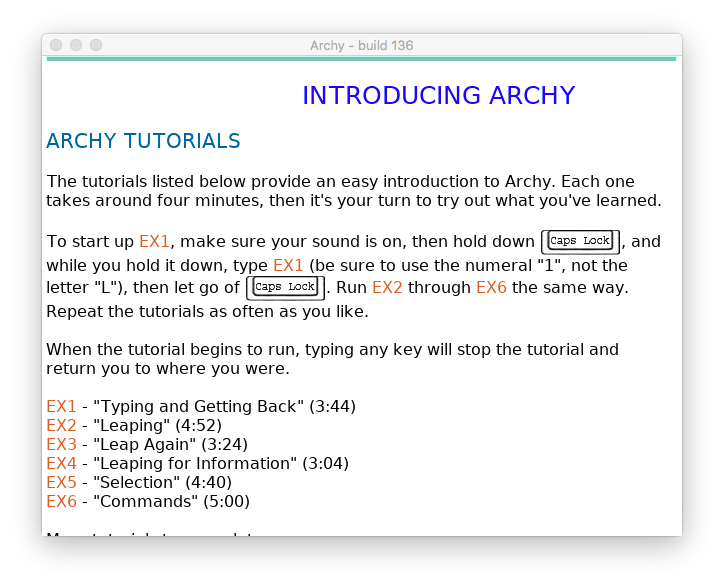
<p><img src="https://raw.githubusercontent.com/DanielFeichtinger/Archy/master/archy.png" alt="Archy" /></p>

<p>You can think of applications as walled cities — they have to develop all of
their own infrastructure. If you’re making Photoshop it needs to have spell
check because you have a text editor in there, and if you’re making Word you
need to have Photoshop abilities because you’re putting in photos and you’ll
want to edit them. Over time the applications have to continue to increase in
size and subsume more and more functionality until every application starts to
converge from different directions on the same kind of application.</p>

<p>If that is where bloat comes from, and if 95% of the feature requests for
features in Word are features that already existed in Word, maybe it’s the
application as a framework which is broken. You want to tear it apart and just
have functionality that you can use anywhere.</p>

<p>There were no files, because the best label for a file is the file itself, the
content of it. Everything was in one long, conceptual document, but we know that
human beings work very well with spatial memory, so what you want is to have all
of your content and work projects stored spatially. It’s supposed to be a
full-on zooming user-interface (ZUI), so no matter where you are you can zoom
out and grab your bearings, and zoom in ad infinitum, a much better way of doing
folders and taxonomies.</p>

<p>Computers have this incredible magical power and text can do so much more than
just a Word document can do. There’s a recent project called
<a href="https://beta.observablehq.com/">Observable</a> by Jeremy Ashkenas, and
<a href="https://mrdoob.com/">Mr. Doob</a> and while it’s a very different take I think
starts to get towards a little bit of what that vision of Archy was. That magic
of being able to program a little, have parts of your text talk to other parts
of your text, to have your documents be really alive and you can just cast magic
at it. That it starts as simple as being able to type characters, that it has
incremental search so that you can move at the speed of your own thought, that
there are very few hand gestures that are unnecessary, all the to any bit of
text can refer to any other bit of text, and you can run any command and do any
functionality from anywhere, that you could open up your tools and it was all
coded in the same environment, that you were making in, very Smalltalk or Alan
Kay-like, and so your tools themselves can be modified in real-time to modify
themselves if need be. I think that’s a little of the vision of what Archy was
supposed to be like.</p>

<h1 id="lineage">Lineage</h1>

<p><strong>HC</strong>: That’s fascinating. It seems there is that inspiration of lineage and
indirectly drawing on the same resources. They are all modern environments which
have little bits and pieces of that which feels like this resurgence of
notebook-style editors.</p>

<p><strong>AR</strong>: Exactly. Sort of like <a href="http://jupyter.org/">Jupyter</a> but the next
iteration. And all of these things start to point back to much older concepts,
from <a href="https://en.wikipedia.org/wiki/HyperCard">HyperCard</a> to even
<a href="https://en.wikipedia.org/wiki/Project_Xanadu">Xanadu</a>.</p>

<p><strong>HC</strong>: The Humane Interface and Jef’s work through the Canon Cat were big
inspirations, but clearly your throwing around a lot of older projects as
inspiration as well. Were there any others that you would say were concretely
referenced as providing input?</p>

<p><strong>AR</strong>: Yeah, originally we thought we might implement Archy on top of
Smalltalk, and Scratch. I think it’s really interesting now that the next person
picking up that mantle is Bret Victor now at
<a href="https://dynamicland.org/">Dynamicland</a>. It’s a tangible version of very similar
concepts.</p>

<p><strong>HC</strong>: It’s interesting that you mention Smalltalk as it feels that there are
similar ideas in there. For instance, no applications — you’ve just got content
that you’re operating on.</p>

<p><strong>AR</strong>: That’s exactly right. In some ways you can think of the command system
of Archy as being just like Unix commands. You hold down a button (so it’s a
<a href="https://en.wikipedia.org/wiki/Mode_(computer_interface)#Quasimodes">quasimode</a>,
you start typing what you want to do, like ‘spell check this’. It knows what the
input expects and what the output expects, so if you run it on text of course it
spell checks the text, but if you run on an image it should run OCR and then do
spell check on top of that. It should be able to ask the system ‘I have an image
but I expect text, do you have anything that turns images into text?’ then it
should all just happen behind the scenes.</p>

<p><strong>HC</strong>: I can see that underlying similarity, and yet the concrete realisation
of projects is obviously very different, you know, Smalltalk embraces iconic
representation and involves heavy mouse usage, whereas the Archy system and what
you’d built was almost a direct rejection of a lot to that.</p>

<p><strong>AR</strong>: There’s certainly a very heavy keyboard focus because there’s so much
emphasis put on thinking through the
<a href="https://en.wikipedia.org/wiki/GOMS">GOMS modelling</a>, thinking through where
errors happen and trying to minimise time and maximise information theoretic
efficiency. The mouse was just not great for that.</p>

<h1 id="future-plans">Future Plans</h1>

<p><strong>HC</strong>: You’re quoted as saying that this was an environment of something that
you’d like to boot up into, so maybe not an operating system per se, but
essentially a complete computing environment. Am I correct in thinking that was
the plan?</p>

<p><strong>AR</strong>: Yeah absolutely. Imagine Chromebook-style. If we were re-implementing it
now maybe we’d do in on top of the Web as a platform, and then you’re sort of
done. You can boot up directly into it. That can be your world.</p>

<p><strong>HC</strong>: So you were imagining hardware as well? From using it one thing I did
feel was that the dedicated keys for LEAP and Command would certainly have been
enormously useful.</p>

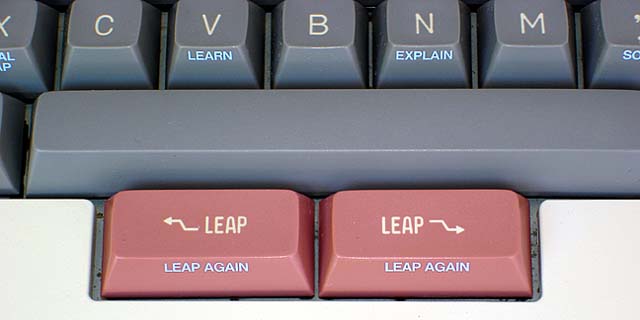
<p><strong>AR</strong>: A LEAP key changes everything. If my memory serves we were thinking
about a keyboard that has all of the software on it, so that you can walk around
with your keyboard, plug it into a computer that would have Archy on a USB drive
inside of it, and so the entirety of your text, history, preferences, everything
would just come along with you. You just needed to carry your keyboard an plug
it in.</p>

<p><img src="http://www.oldcomputers.net/pics/canon-cat-leap-keys.jpg" alt="Detail" /><br />
— Detail of the LEAP keys on a Canon Cat <a href="http://www.oldcomputers.net/canon-cat.html">(source)</a></p>

<p><strong>HC</strong>: Having read The Humane Interface and the roadmap for Archy it seems that
the
<a href="https://web.archive.org/web/20060221192614/http://rchi.raskincenter.org:80/index.php?title=ZUIs">ZUI was a big component that was missing</a>.
Had you started development on it?</p>

<p><strong>AR</strong>: Yeah, we were really focusing on the text editing, maybe even the
coding. If, conceptually, a spreadsheet, a document, and a code editor have a
baby, what do you end up with?</p>

<p>Doug McKenna wrote a fully zooming map library behind the interface. One of the
problems you end up having with infinite zooming spaces if you just do a naive
implementation is that you can zoom in until you hit the end of the precision of
floats and all of a sudden the ZUI just start to like bounce around. That
requires some careful thought.</p>

<p>You might want a portal so that you zoom from one area into another — the
equivalent of a symlink. Now you can teleport into another part of the ZUI, but
when you zoom out you always want zoom out to be the equivalent of going back,
like the back button in a browser. So you have to do careful hand-off of
coordinate systems, a lot of really interesting caching problems, and so Doug
wrote that for use with the cellphone prototype we were working on. We put a
demo of how this might work, a Flash demo where you could zoom in and zoom out,
see annotations on Web pages. Bret Victor actually got involved and he
<a href="http://worrydream.com/GesturalZoomAndPan/#main">created a corollary zooming user interface prototype</a>
and we went back and forth with a couple of different iterations.</p>

<p><strong>HC</strong>:
<a href="https://groups.google.com/forum/#!msg/canon-cat/wdJP3IpyN68/_7daSiAcJpkJ">There was some mailing list post from a while ago</a>
talking about the size of the project: ‘Archy turned out to be too big a project
for what the small team were capable of. It was more complex given the number of
specced features surrounding universal undo than any I know of.’ Can you
elaborate on that?</p>

<p><strong>AR</strong>: Oh yeah, it’s just really simply observations. Anything you do on the
computer you should be able to undo. You don’t feel like you’re walking through
landmines. If you do the wrong thing or touch the wrong button you won’t be able
to recover from it. So the question is: if you are making an extensible system,
how do you have it so that every application you can always get back to from the
last step?</p>

<p>It’s something we want in real life, it’s the ability to take back the thing we
just said, and at the very least we can do that on the computer.</p>

<p>But what does it mean to hit undo if you have a collaborative document that
multiple people are editing, does hitting undo just undo yours, or does it undo
everyone’s? Should undo operate just in the document that I’m currently looking
at, or does it undo the global thing?</p>

<p>There are a really interesting set of problems that come from a very simple
thing which is the principle of being able to get back to where you were and
keeping the environment always safe.</p>

<p><strong>HC</strong>: Were there any big ticket items or anything glaring that you didn’t get
on the roadmap?</p>

<p><strong>AR</strong>: One of the largest problems was figuring out how this thing could really
become your new environment to work in. How do you interoperate? You’re going to
want to be doing all of your editing and coding inside of this thing, but the
predominant form of doing that now are lots and lots of files. How do we interop
between a world where there’s folders and files, to a world where there’s just
one really long document or ZUI? Figuring out all of those bridges so that you
could gracefully upgrade people from the current day to the Archy world. I think
it was sort of an open-ended question: ‘How do we want to do that bridge’.</p>

<p><strong>HC</strong>: Did you ever think about compromising, or was it the case that Archy was
this very opinionated stance and other things were going to have to figure out
how to fit into it?</p>

<p><strong>AR</strong>: We were definitely thinking more of the “this is a different way of
doing computing”, so we would rather figure out the way of doing it in our
world. Even coding. We thought a lot about, that seemed to make sense in the
zooming world.</p>

<p>So those were the big ticket thought items where we had first stabs and gestures
at it, maybe even a couple of prototypes, but they were super-early stage. I
think we all knew those were going to be a place to put a lot of conceptual
work. Just trying things out and figuring out. It’s always through making that
you shine a flashlight on the ideal between concept and implementation.</p>

<p><strong>HC</strong>: Interesting that you mention that because I think whilst I understood
the roadmap and all the pieces, but there were a few gaps where I didn’t quite
see how it connected through, and one of them was the Web, and that left a bit
of a question mark for me. The other one was creative media-style applications,
audio workstations, video, drawing applications. In some places it seemed like
that might be a hard conceptual gap to close.</p>

<p><strong>AR</strong>: Yeah, I think the Web is a particularly interesting one, because our
thought was wherever you have a link you would just embed the link, like the
entire Webpage, as a thing next to a link that you could zoom in to. That’s the
base layer, and you can start playing with that, and have something a little bit
better, something new.</p>

<p>Drawing is much easier because it’s not an application, it’s not a thing you go
to. It’s a set of tools that come to you. Any time, anywhere you’d be able to
pull up the palette and just start drawing, whether it’s on a Web page or on a
document that you’re typing. You can just draw on the canvas of the ZUI world in
general. If you zoomed out you’d be near a set of photos from some trip, and you
can just write using whatever photo editing or illustration tool you had, for
instance, ‘My trip to Panama’, or just a giant heart. You can just modify the
space.</p>

<p>That’s a big part of the shift, thinking about the nouns of the world, the
substrate of the ZUI, of the text document, as just an object which you could
call up different verbs to do whatever you want with them.</p>

<h1 id="beyond-archy">Beyond Archy</h1>

<p><strong>HC</strong>: I wanted to move on to the end of Archy and the beginning of
<a href="http://web.archive.org/web/20140109034140/http://humanized.com/">Humanized</a> and
the work that you were doing there. Could you give us a quick recap of the
circumstances surrounding that changeover?</p>

<p><strong>AR</strong>: Around the time that Jef got very sick we also got a fairly large
contract to work on a zooming operating system for a Samsung phone. So this was
my final year of college, so pretty exciting to be like here is a concept of a
phone that could get out to a whole slew of people. It was clear that — this is
back in the day of flip phones and WAP browsing — so we were like, cool, instead
of trying to fix the current system we’re trying to paint a picture of where
these interfaces could go in the new form factor. Jef was really interested in a
clear keyboard which you could type from behind, and we actually implemented.</p>

<p>And then, and I guess this sometimes happens, there was some political stuff
that happened where the partner who was working closely with Samsung I think
felt didn’t like that I and a couple of other people were much younger and still
in college and leading the charge, and he wanted to lead. So he sort of
threatened the money over it. I think that whole thing sort of, in many ways,
took away the momentum of the thing we were working on. I remember I think I got
fired, then hired again, then fired, then they tried to hire me again, and I was
like ‘Nah, I don’t really want to do this’.</p>

<p>A group of us, Atul Varma, Jono DiCarlo, Andrew Wilson, and I decided to start a
company to take one particular aspect of Archy and bring it to the world. Andrew
was my college roommate, the other two, Jono and Atul, were in Jef’s class that
he taught at The University of Chicago on interface design. And that’s how
Humanized was formed, and in particular how Enso, which then became
<a href="https://en.wikipedia.org/wiki/Ubiquity_(Firefox)">Ubiquity for Firefox</a> ended
up getting created.</p>

<p><strong>HC</strong>: There’s an obvious connection between the two systems there. You were
still iterating around the same idea, the vision that Jef had laid down. If
Archy was the big vision, were you clear that you were still trying to get back
to that, or would you rather see this broadly adopted, even if it’s just a small
part?</p>

<p><strong>AR</strong>: Yeah exactly, it was like “how do we take this to prototype and get it
out?”.</p>

<p>For me the mantra that I was operating under then is that the best way to honour
someone’s memory is to channel them into your own passion to make the world a
better place.</p>

<p>The core concept that I was always super taken with with Archy is this idea that
we need to switch to this model where you say what you want and the computer
does it. So you can select some text and say ‘email this to Jono’, and it will
know from my own past history whether to send in IM or text or an email. You can
select something anywhere and say ‘map this’, and it will go off to the Web and
find a map and even if you’re in Microsoft Word it will inject an image back or,
if it can, something smarter, something live.</p>

<p>We thought with that this we could see how to implement it using accessibility
controls to bring it to computers as they stood back then.</p>

<p><strong>HC</strong>: So there was an acquisition by Mozilla between Enso and Ubiquity. So
Ubiquity was Firefox focussed?</p>

<p><strong>AR</strong>: Yeah, exactly. There was actually a hidden thing in there that Mark
Shuttleworth of Canonical tried to buy our team first to have us go run design
for Ubuntu. There was a good half-year where we were working on this deal where
they wanted us to go take some Jef’s ideas, our ideas, some of the concepts of
Archy and make it part of, at that point, the third largest desktop OS in the
world.</p>

<p><strong>HC</strong>: I’m glad you mentioned that as I had this vague recollection that I had
heard that rumour somewhere but I wasn’t able to source it.</p>

<p><strong>AR</strong>: Yeah it was never published. We flew over to Spain, we met all the team,
we spent a long time thinking about it, but it was never public, I guess. Now it
can be. Well we never said we couldn’t, we just never talked about it.</p>

<p><strong>HC</strong>: It seems like there were fans, or acknowledgment of Archy through the
continuing work of Humanized. You mentioned Brett Victor, Mark Shuttleworth, are
you aware of anyone else who was inspired by or affiliated with the program?</p>

<p><strong>AR</strong>: Yeah, let’s see. Of course with Ubiquity we grew that up to two million
users, which was pretty exciting. That got the largest adoption. You can see in
<a href="https://qsapp.com/">Quicksilver</a> and in <a href="https://www.alfredapp.com/">Alfred</a>
many similar ideas. Nicholas Jitkoff and I certainly had a lot of conversations,
so there was certainly inspiration that went both ways there. I never knew the
team at Alfred but there was some sort of back and forth.
<a href="https://ia.net/writer">AI Writer from Information Architects</a> takes a lot of
inspiration from Jef’s work and Archy, and they even thought about building LEAP
keys at some point.</p>

<p>There’s a <a href="http://www.raskinformac.com/">zooming user interface called Raskin</a>,
which I haven’t played around much with, but that’s clearly inspired by Jef’s
work, and our ZUI work in particular.</p>

<p>And in many ways, and I don’t know the causal link, but the voice commands of
today, Siri and Cortana, all these things, to me trace back to Ubiquity and then
Archy, as a kind of to speak to get it to do what you want it to do.</p>

<p>Even the zooming user interface with the iPhone, where you click on the folders
and you sort of zoom in and zoom out. That’s like an actual ZUI used by hundreds
of millions of people, as limited as it is.</p>

<p><strong>HC</strong>: Even things like persistent documents, no-save and auto-save, kind of
restore back to the current state of a simpler thing that’s now pretty
pervasive. I don’t really recall it being that common.</p>

<p><strong>AR</strong>: It was not. I remember going round the early Web and just talking about
have ridiculous it was that we even still had the save icon which was the floppy
disk. I was like, dude no one knows what this is. A lot of that kind of work,
the Web 2.0 kind of work of, like don’t use a warning when you use undo, and
having the undo features in Gmail, I think that certainly was in Jef’s work
first. That one I don’t know how direct the inspiration was, but I think the
argument could be made that Jef’s work was pretty influential there.</p>

<h1 id="retrospective">Retrospective</h1>

<p><strong>HC</strong>: A lot has happened since then. I’m thinking the big change to personal
computing which came in around 2007, the introduction of the iPhone. Obviously
Archy and in some sense the other interfaces were very keyboard driven, you seem
to also be suggesting that it could have also been voice-driven? The ZUI might
carry over to a multi-touch world to some extent?</p>

<p><strong>AR</strong>: Yeah I feel like the ZUI world could fit very well on a phone. It could
be a really natural way of seeing all of your photos and all of your documents,
and having a sort of spatial map. I think the fundamental problem we always ran
into with ZUIs when we start to actually implement, because the amount of
information you have to put in to get some place, versus just tapping on
something, makes it a little harder. That was a problem we never solved. You’d
have to navigate, zoom-in and zoom-out, as opposed to doing two or three taps to
get some place. There was a tension in the design which we had never fully
resolved.</p>

<p><strong>HC</strong>: Is your gut feeling that that was something that was just inherent, or
was it something that required engineering?</p>

<p><strong>AR</strong>: Yeah I think it would require some real building and testing. The other
paradigms have had thirty years now of A/B testing at an industry scale for what
makes for a good GUI, and here we were starting from the very beginning. What
makes a good ZUI? The rest of the world has a twenty to thirty year head start.
So i think it would take some iteration to get it right.</p>

<p><strong>HC</strong>: When you look back on the work you were doing with Archy and then
through to Ubiquity, was there anything that you would have done differently,
maybe if you’d had the full benefit of knowing what was to come?</p>

<p><strong>AR</strong>: Oh man, so many things. Hindsight is a terrible mistress in that way. I
think if I was going back I still think the direction that we’ve gone with Siri
and Alexa, we could have pushed on that further. I’d have done it all open
source, and I’d have done it cross platform, and focussed on in on that idea. We
could have pushed it further, faster. We took the quasi-modes very seriously,
and some said that may have hampered adoption.</p>

<p><strong>HC</strong>: Do you think that was too much of a habit shift for people?</p>

<p><strong>AR</strong>: Yeah, and it was also really awkward on current keyboards. We always had
to come up with these clever hacks that you could type at the same time and you
had to hit shift twice, or you’d have to remap your caps lock key, it was just a
little bit inelegant. So that I think would certainly be one change.</p>

<p>I think there was a big opportunity early, early Web to do a text editor. We
were really inspired by <a href="https://en.wikipedia.org/wiki/MoonEdit">MoonEdit</a>,
which is a collaborative text editor who had its own client pre-Web. I think if
we started with ‘Okay, what does the Web enable?’ Let’s jump in with new things
that the Web can do and use that as the thin end of the wedge to get sort of the
Archy-style text editor going, instead of doing it in Python as a desktop app. I
think that would have been a really interesting way to have brought the ideas
out. You can imagine what would have happened if Google Docs had been Archy.
That would have been fascinating.s</p>]]></content><author><name></name></author><summary type="html"><![CDATA[Many years ago I read The Humane Interface by Jef Raskin which completely upended my notion of computing. It showed a vision of a world of computing which was radically different from the prevailing paradigms. Until then, I hadn’t even realised that it was even possible to question core artefacts like files or applications.]]></summary></entry><entry><title type="html">Review: The Science of Managing Our Digital Stuff by Ofer Bergman and Steve Whittaker</title><link href="/review-the-science-of-managing-our-digital-stuff/" rel="alternate" type="text/html" title="Review: The Science of Managing Our Digital Stuff by Ofer Bergman and Steve Whittaker" /><published>2018-03-05T17:51:42+00:00</published><updated>2018-03-05T17:51:42+00:00</updated><id>/review-the-science-of-managing-our-digital-stuff</id><content type="html" xml:base="/review-the-science-of-managing-our-digital-stuff/"><![CDATA[<p>For a long time I’ve held this conviction that hierarchical file systems are a
disaster. Over the years, there have been many attempts at building systems
which avoided them: the entire hypermedia lineage from
<a href="https://en.wikipedia.org/wiki/Memex">Vannevar Bush’s Memex</a> with trails,
through Ted Nelson’s work, and on to efforts like
<a href="https://en.wikipedia.org/wiki/HyperCard">HyperCard</a>, along with completely
different approaches like the
<a href="https://en.wikipedia.org/wiki/Canon_Cat">Canon Cat</a> (and related,
<a href="https://en.wikipedia.org/wiki/Archy">Archy</a>) and
<a href="http://www.cs.yale.edu/homes/freeman/lifestreams.html">Lifestreams</a>. The
common motivation seems to be that nested folders are a bad match for human
thought.</p>

<blockquote>
  <p>We sought to reduce the influence of hierarchical directories and conventional
files (which we see as large lumps with stuck names in fixed places, with
compulsory gratuitous naming — unsuited to overlap, interpenetration, rich
connectivity, reasonable backtracking, and most human thinking and creative
work.)</p>

  <p>—<a href="http://www.xanadu.com.au/ted/XUsurvey/xuDation.html">Ted Nelson, Xanalogical Structure</a></p>
</blockquote>

<p>It’s hard not to disagree — I’m relatively fastidious with my organization and
my home folder is still full of incomprehensible structures accumulated over the
years, not dissimilar to this XKCD comic:</p>

<p><img src="https://web.archive.org/web/20181127054348im_/https://humane.computer/content/images/2018/02/filesimg.png" alt="" /></p>

<p>– <a href="https://xkcd.com/1360/">xkcd 1360</a></p>

<p>However, history has not been kind to these projects — I’ve tried a few myself
and they’re okay for a while, but I keep coming back to traditional systems,
despite their flaws. Desktop operating systems are still based around folders,
more Web apps and mobile apps use a “simulated” files and folders
representation, to the point where iOS 11 now adds a “Files” app avoided for the
previous ten releases.</p>

<p>In a way, this shouldn’t be surprising. The
<a href="https://en.wikipedia.org/wiki/Lindy_effect">Lindy Effect</a> tells us that the
longer something non-perishable, like an idea, has been around, the longer its
expected lifespan. There’s clearly something powerful behind files and folders,
and a thorough analysis of why might give us a framework by which to understand
improvements and alternatives. I was stuck without a clear path forwards until I
discovered the fantastic book
<a href="https://mitpress.mit.edu/books/science-managing-our-digital-stuff">The Science of Managing Our Digital Stuff</a>
by <a href="https://mitpress.mit.edu/authors/ofer-bergman">Ofer Bergman</a> and
<a href="https://mitpress.mit.edu/authors/steve-whittaker">Steve Whittaker</a>. The
book is a summary of the work done in the space of Personal Information
Management (PIM) over the past few years, including many studies designed by
themselves. From the blurb:</p>

<blockquote>
  <p>Bergman and Whittaker report that many of us use hierarchical folders for our
personal digital organizing. Critics of this method point out that information
is hidden from sight in folders that are often within other folders so that we
have to remember the exact location of information to access it. Because of
this, information scientists suggest other methods: search, more flexible than
navigating folders; tags, which allow multiple categorizations; and group
information management. Yet Bergman and Whittaker have found in their
pioneering PIM research that these other methods that work best for public
information management don’t work as well for personal information management.</p>
</blockquote>

<p>From the book:</p>

<blockquote>
  <p>This book provides a scientific understanding of how we select, organize, and
access such personal collections. Personal information management (PIM) is the
process by which individuals curate their personal data in order to reaccess
that data later. Curation involves three distinct processes: how we make
decisions about what personal information to keep, how we organize that kept
data, and the strategies by which we access it later.</p>
</blockquote>

<p>A poorly designed PIM system can result in “lost personal data”, “large,
disorganized personal collections of unclear value”, and “failing to deal with
time-sensitive information that requires action”. So far, so good. However,
there’s a fundamental tension at the heart of things:</p>

<blockquote>
  <p>Choosing appropriate folder organization and labels therefore requires people
to predict exactly how they will be thinking about particular information at
the time that they need to retrieve it. Predicting future retrieval context is
difficult, because there are usually multiple ways that a file can be
categorized, such as by author, topic, date or project. The inability to
accurately predict how one will think about information in the future makes it
more likely that future retrieval will fail.</p>
</blockquote>

<p>After walking through a number of alternatives to folders (search, tagging,
group management) and showing that in user studies they don’t perform as well as
folders, they get to the crux of their argument. Navigating folders is a spatial
task, rather than a linguistic one like search or tags, which uses a different
part of the brain:</p>

<blockquote>
  <p>Throughout millions of years of evolution, humans have developed mechanisms
that allow them to retrieve an item from a specific location (be it real of
virtual) by navigating the path that they first followed when storing that
information. These deep-rooted neurological biases lead to automatic
activation of location-related routines, which have minimal reliance on
linguistic processing, leaving the language system available for other tasks.</p>
</blockquote>

<p>PIM systems have a purpose and should be measured and evaluated as such. This
gives us a framework by which to start comparing and improving on the
traditional folder structure, as they do in the latter part of the book. One
suggestion, which I very much agree with, is to get rid of application specific
storage locations:</p>

<blockquote>
  <p>Documents relating to a given project are stored in one folder hierarchy
(e.g., in My Documents), emails in a separate mailbox hierarchy, and favorite
websites in yet another browser-related hierarchy…Although the additional
structure solution allows users to work in an integrated project environment,
it requires managing yet another structure and may increase cognitive
complexity. As well as the additional requirement to create a new structure,
the user now has yet another retrieval location to maintain and remember.</p>
</blockquote>

<p>The book also leaves open the question of how to manage the interface between
public or group information management, where search, hyperlinks, and tags do
quite well, and the spatial world of PIM. Perhaps systems should be designed to
respect the boundary: shared work drives, like Google Drive, shouldn’t have a
shared folder structure but should be tagged and linked (which are shown to work
well in group settings and novel content). Individuals can then pull those
resources locally, with a stable location that they can navigate to when they
need to exploit them.</p>

<p>There are some interesting technologies not evaluated that I would have loved to
have seen in the book. The Plan 9 style unioned directory structure, and whether
that helps or hinders spatial navigation (I feel like it would help, as
traditional directories mix orthogonal concerns, like which physical drive the
data is stored on). I would also love to have seen an in-depth discussion of
<a href="https://en.wikipedia.org/wiki/Zooming_user_interface">Zooming User Interfaces</a>
such as
<a href="https://mrl.nyu.edu/publications/sig93-pad/siggraph-93-origpad.pdf">Pad</a>.
They have their own issues
<a href="http://www.cs.umd.edu/hcil/trs/2009-21/2009-21.pdf">(a good overview here)</a>
but proponents did clearly understand the neurological processes behind spatial
navigation:</p>

<blockquote>
  <p>We can find things in such a planning room
[a room dedicated to project planning where the walls are covered in sticky notes, photos etc.]
because we tend to remember landmarks and relative position. “The stuff about
marketing is on the right wall, sort of lower down near the far corner,”
someone might tell you. On another occasion, you go right to a particular
document because you remember that it is just to the left of the orange piece
of paper that Aviva put up.</p>

  <p>— Jeff Raskin, The Humane Interface</p>
</blockquote>

<iframe width="100%" style="aspect-ratio: 16/9" src="https://www.youtube.com/embed/0gLw34-AzXM?si=fdXFgl46t2eOGvav" title="YouTube video player" frameborder="0" allow="accelerometer; autoplay; clipboard-write; encrypted-media; gyroscope; picture-in-picture; web-share" referrerpolicy="strict-origin-when-cross-origin" allowfullscreen=""></iframe>

<p>All of which is fascinating, but the real breakthrough realisation for me came
with this section:</p>

<blockquote>
  <p>The main aim of information item classification in PIM is not to externalize
our internal representation of these items (Hsieh et al. 2008) or to fully
describe them, as implied by Civan et al. (2008), but to support easy, fast,
and efficient retrieval.</p>
</blockquote>

<p>Novel information management systems need to understand that they are a tool to
serve a purpose and conduct usability studies to ensure that they’re achieving
them. The Lindy Effect is strong: files and folders have been around for a long
time, and their staying power is testament to how well they achieve their task.
Future PIM proposals will do well to internalise this and look to build on their
strengths while addressing current weaknesses.</p>]]></content><author><name></name></author><summary type="html"><![CDATA[For a long time I’ve held this conviction that hierarchical file systems are a disaster. Over the years, there have been many attempts at building systems which avoided them: the entire hypermedia lineage from Vannevar Bush’s Memex with trails, through Ted Nelson’s work, and on to efforts like HyperCard, along with completely different approaches like the Canon Cat (and related, Archy) and Lifestreams. The common motivation seems to be that nested folders are a bad match for human thought.]]></summary></entry><entry><title type="html">Unifying File Systems, Objects, and Resources</title><link href="/unifying-file-systems-objects-and-resources/" rel="alternate" type="text/html" title="Unifying File Systems, Objects, and Resources" /><published>2018-01-08T13:56:53+00:00</published><updated>2018-01-08T13:56:53+00:00</updated><id>/unifying-file-systems-objects-and-resources</id><content type="html" xml:base="/unifying-file-systems-objects-and-resources/"><![CDATA[<p>I often have this vague sense that the artefacts of computing that we see today
are often small, fragmented facets of some deeper “truth”. One area that I keep
coming back to is the similarities and overlaps between file systems, objects,
and Web resources.</p>

<p>Files, organised into directories, appear in almost every operating system since
<a href="https://en.wikipedia.org/wiki/Multics">Multics</a>, and there appears to be
something essential about them. Mobile operating systems tried to remove files
from the user’s view, but they’re making a comeback. It appears as though you
can’t avoid them.</p>

<p><img src="_https://web.archive.org/web/20181127054348im_/https://humane.computer/content/images/2017/11/fjcc4-fig2.gif" alt="" />
— <a href="http://www.multicians.org/fjcc4.html">A General-Purpose File System For Secondary Storage</a></p>

<p>Wikipedia states: “A computer file is a computer resource for recording data
discretely in a computer storage device.” This seems intuitively obvious — their
origin is in the fact that RAM is volatile so information is lost when a machine
loses power. That information should be persisted between restarts, and discrete
sections of that information should be independently addressable.</p>

<p>It seems as though as an abstraction they’ve been massaged a little over the
years, but their essential nature hasn’t changed — or has it? To the best of my
knowledge, the notion that a “file” had to map to a disk region started to
evaporate with the introduction of
<a href="http://lucasvr.gobolinux.org/etc/Killian84-Procfs-USENIX.pdf">procfs in 1984</a>
in Unix 8. It is convenient to represent run-time information in the same way as
disk backed information because you immediately inherit all the tools and
utilities that work with files and directories. Files have the benefit of having
a name that can be passed around as a reference, structured in a way that can be
“walked”.</p>

<p>Plan 9 takes things further and introduced
<a href="http://doc.cat-v.org/plan_9/4th_edition/papers/9">Control Files</a>, which allow a
program to write to one area of the file and read a response from another. This
starts to look a lot like methods on objects, something pointed out in Stephen
Kell’s fascinating paper
<a href="https://www.cl.cam.ac.uk/~srk31/research/papers/kell13operating.pdf">“The Operating System, Should There Be One?”</a>,
which also points out that this ad-hoc agglomeration of behaviour has left some
semantic gaps:</p>

<blockquote>
  <p>As the filesystem’s use has expanded, its semantics have become less clear.
What do the timestamps on a process represent? What about the size of a
control file? Is a directory tree always finite in depth (hence
recursable-down) or in breadth (hence readdir()-iterable)? Although some
diversity was present even when limited to files and devices (is a file
seekable? what ioctls does the device support?), semantic diversity inevitably
strains a fixed abstraction. The result is a system in which the likelihood of
a client’s idea of “file” being different from the file server’s idea is
ever-greater. It becomes ill-defined whether “the usual things” one can do
with files will work. Can I use cp to take a snapshot of a process tree? It is
hard to tell. The selection of what files to compose with what programs (and
fixing up any differences in expected and provided be- haviour) becomes a task
for a very careful user. Unlike in Smalltalk, semantic diversity is not
accompanied with any meta-level descriptive facility analogous to classes.</p>

  <p>—<a href="https://www.cl.cam.ac.uk/~srk31/research/papers/kell13operating.pdf">The Operating System, Should There Be One?, Stephen Kell</a></p>
</blockquote>

<p>Yet another angle is taken by the Web, which names resources by URL, which, when
fetched, return a representation. This could be a straightforward static read of
bytes on a disk, but equally can be dynamically generated on demand,
personalised for each client.</p>

<p>HTTP exposes a small set of verbs to operate over those resources, and HTML
itself only really uses two (GET and POST), but really, the power of the Web
model is that the behaviours exposed by the server are embedded in the resource
itself. This enables a decentralised system, at a lack of meta-level
standardisation.</p>

<p>There are clear parallels to the Unix file system structure in the design of
URLs. <a href="https://www.w3.org/DesignIssues/Security-Origin.html">Tim Berners-Lee</a>
wrote: “In many web browsers like the classic Apache, the URL space maps
directly to chunks of the unix file system. This is deliberate as many good
things come with the unix file system.” And the similarity to objects and
message passing has been noted many times. What I hadn’t appreciated until
recently is that Tim made the argument that resources subsumed not only files,
but folders too:</p>

<blockquote>
  <p>It is crazy, if you think about it, that the whole screen is used to represent
the information which happens to be on your local file system, using the
metaphors of folders, while one window is used to represent the information in
the rest of the world, using the metaphor of hypertext. What’s the difference
between hypertext and a desktop anyway? You can double click on things you
find in either. Why can’t I put folders into my hypertext documents? Why can’t
I write on the desk? Folders should be just another sort of document. My home
page could be one, or it could be a hypertext document. The concepts of
“folder” and “document” could be extended until they were the same, but I
don’t think that that would be necessarily a good idea. It’s OK to have
different forms of object for distinctly different uses.</p>

  <p>— <a href="https://www.w3.org/DesignIssues/UI.html">Consistent User Interface, Tim Berners-Lee</a></p>
</blockquote>

<p>(As an aside, when I’m looking at open-source code, I often find myself
preferring the Github file browser. My best guess as to why, is that it renders
Readme documents at the same level as the folder contents, which makes
navigating around large codebases, appropriately documented, much simpler.)</p>

<p>While there is a large overlap between objects, files, and resources, systems
tend to treat them very differently; clients for file systems are focused around
creating and managing files, whereas Web clients seem generally built around the
assumption that users are browsing existing information, and objects are
generally left to programming languages, or at best, programming environments
like Smalltalk or Self.</p>

<p>As with the introduction of the proc filesystem, I think there’s a huge amount
of power to be gained from providing a consistent model of interaction with
addressable items in the system. Software could become simpler and more powerful
by virtue of not being siloed by arbitrary type, and users would have a smaller
mental burden. There are a couple of bright spots on the horizon: Google’s
experimental operating system, Fuschia, seemingly takes inspiration from Plan 9
with its
<a href="https://fuchsia.googlesource.com/docs/+/HEAD/namespaces.md">namespaces</a>, and
Upsin, a distributed file system for personal data, has APIs to encourage
<a href="https://upspin.io/doc/overview.md">dynamic services being exposed as files</a>.</p>

<p>I think that there could be some powerful, universal model of recording and
accessing state in a system, and these 3 approaches are all converging on this
point in the design space, albeit from very different angles. I believe that in
the future it will be inevitable that these models are treated in a unified
manner, and I think that computing systems that do will be conceptually much
simpler than the fragmented systems of today.</p>]]></content><author><name></name></author><summary type="html"><![CDATA[I often have this vague sense that the artefacts of computing that we see today are often small, fragmented facets of some deeper “truth”. One area that I keep coming back to is the similarities and overlaps between file systems, objects, and Web resources.]]></summary></entry><entry><title type="html">Unifying Web and Native Systems</title><link href="/unifying-web-and-native-systems/" rel="alternate" type="text/html" title="Unifying Web and Native Systems" /><published>2017-10-05T17:05:19+00:00</published><updated>2017-10-05T17:05:19+00:00</updated><id>/unifying-web-and-native-systems</id><content type="html" xml:base="/unifying-web-and-native-systems/"><![CDATA[<blockquote>
  <p>Marc Andreessen of Netscape announced a set of new products that would help
transform their browser into what he called an “Internet OS” that would
provide the tools and programming interfaces for a new generation of
Internet-based applications. The so-called “Internet OS” would still run on
top of Windows — being based around Netscape Navigator — but he dismissed
desktop operating systems like Windows as simply “bag[s] of drivers”,
reiterating that the goal would be to “turn Windows into a mundane collection
of not entirely debugged device drivers”.</p>

  <p>— <a href="https://en.wikipedia.org/wiki/Internet_OS">Internet OS, Wikipedia</a></p>
</blockquote>

<p><strong>Intro</strong></p>

<p>The Internet OS is the natural result of asking a simple question — why are
there 2 platforms for applications in current-day systems; native and Web? For
proponents of the Internet OS, the answer is simple; get rid of native apps, and
standardize around the Web. The most prominent example of this philosophy today
is <a href="http://www.chromium.org/chromium-os">Chrome OS</a>, Google’s stripped back
version of Linux, designed to run the Chrome browser exclusively.</p>

<p><img src="https://upload.wikimedia.org/wikipedia/commons/8/81/Chromium_OS_%28updated%29.png" alt="" /></p>

<p>— Chrome OS (<a href="https://commons.wikimedia.org/wiki/File%3AChromium_OS_(updated).png">source</a>)</p>

<p>It’s worth noting that the term “OS” is a little overloaded these days, but
clearly, in this sense, it is not being used to cover the lowest level hardware
control (kernel, device drivers, etc.) but the user-space platform; the APIs and
services that user-applications are programmed against.</p>

<p>I am very much in favour of such an effort. A divided world of behaviour seems
wasteful, and I think a cross-device, hyperlinked environment is the stronger
starting point than a single machine, hardware-oriented abstraction layer. But
despite 20 plus years of focus and investment in the space, it still hasn’t
taken off. Even though there’s a constant stream of now, high-quality web apps,
I can’t help but feel that something is missing. I frequently have to step out
of the browser environment to get things done. And it doesn’t seem as though I’m
alone in that:</p>

<blockquote>
  <p>So far, a big fan of ChromeOS and Crouton. Can easily chroot over to Ubuntu
and get stuff done then flip back.</p>

  <p>– <a href="https://twitter.com/qrush/status/870979991747612672">Nick Quaranto 🇩🇪 (@qrush), June 3, 2017</a></p>
</blockquote>

<p>It’s important to ask why this is. A huge amount of effort is currently being
spent to close the the apparent gap between native apps and Web apps by focusing
on features like speed and minor integration points like notifications. These
are important, but I don’t think that they’re at the root of the issue.
Similarly, if we just start copying features blindly from existing OSs, we may
end up replicating a world that is sub-optimal or a dead-end, and hamper further
development.</p>

<p><strong>The Problem</strong></p>

<p>As mentioned in the previous post <a href="../killing-apps/">Killing Apps</a>, I believe
that a huge amount of friction in software comes at the edges of applications,
where inadequate interoperability solutions means that sophisticated day-to-day
work activities are slow and painful. But at least on the desktop, there are
default interoperability solutions — predominantly around the file system in
UNIX based OSs (exclusively so in Plan 9 and Inferno) or objects in Smalltalk.
While Web applications can expose APIs, there is nothing native to the
browser/server relationship that allows me to take advantage of them; if I wish
to open a presentation made in Slides in another program, one (or both) of them
must have been programmed to support the specific API of the other.</p>

<p>The problem here really feels like a prevalence of early binding, where the data
that Web applications hold can’t be reused in any situation, or in any way, that
wasn’t anticipated by the author. The Web’s architecture is great for
client/server state transfer, but lacks a primitive, universal interface for
composing services. Through the file system or object methods, multiple tools
can be brought to bear on a problem, and this just isn’t possible using only the
traditional browser model.</p>

<p>Here’s an example I was facing today;
<a href="https://support.strava.com/hc/en-us/articles/216917877-Import-Historical-Data-From-Garmin-Connect">how to import historical data from one Web app into another</a>.
The suggested solution? To download a file in one app and upload in the other
(or use a 3rd party app which has been explicitly designed for this transfer).
If you wanted to download a lot of files, tough; it was one by one. Bottoming
out to the file system like this is an okay solution in some ways, but doesn’t
feel native to the Web, and again, relies on application authors to explicitly
enable this option. (A desktop app would, by default, store its data on the file
system somewhere).</p>

<blockquote>
  <p>The most important role of the system is to provide a file system</p>

  <p>— <a href="https://archive.org/details/bstj57-6-1905">The UNIX Time-Sharing System</a> (Ritchie, D.M.; Thompson, K.)</p>
</blockquote>

<p>The lack of a consistent, universal interface for working with data across
applications has hit the browser a number of times. In its original incarnation,
the Web was supposed to be a read write medium.</p>

<p><img src="https://web.archive.org/web/20181127054348im_/https://humane.computer/content/images/2017/10/Screen-Shot-2017-10-05-at-12.38.38.png" alt="" /></p>

<p>— Enquire (<a href="https://www.w3.org/History/1989/proposal.html">source</a>)</p>

<p>Tim Berners-Lee’s Enquire, which predates his work on HTML, had Link, Add, and
Edit items in the menu. Also, for many years, the W3C used to develop the Amaya
browser, which allowed for the creation of any resource, including SVG.</p>

<p><img src="https://www.w3.org/Amaya/screenshots/custom_panel.png" alt="" /></p>

<p>— Amaya (<a href="https://www.w3.org/Amaya/screenshots/Overview.html">source</a>)</p>

<p>I’m a big believer in the intent behind these efforts, so it’s worth spending
some time to think about why it failed. HTML was clearly intended to be a data
storage format — resources would be saved to disk as HTML and served as is. When
document editing features were dropped from browsers (leaving only form
filling), there was an effort in WebDAV to rectify the situation with an
additional set of interfaces. But even the WebDAV model assumes a relatively
static site being served from a file system, with something like index.html in
each folder.</p>

<blockquote>
  <p>4.5. Source Resources and Output Resources Some HTTP resources are dynamically
generated by the server. For these resources, there presumably exists source
code somewhere governing how that resource is generated. The relationship of
source files to output HTTP resources may be one to one, one to many, many to
one, or many to many. There is no mechanism in HTTP to determine whether a
resource is even dynamic, let alone where its source files exist or how to
author them. Although this problem would usefully be solved, interoperable
WebDAV implementations have been widely deployed without actually solving this
problem, by dealing only with static resources. Thus, the source vs. output
problem is not solved in this specification and has been deferred to a
separate document.</p>

  <p>— <a href="http://www.ietf.org/rfc/rfc4918.txt">RFC 4918</a></p>
</blockquote>

<p>Clearly, the real power of the Web turned out to be as a presentation medium
rather than storage medium, where the details of the systems behind the sites
were completely hidden, and HTML just used to serve up the interface. The
situation now is that quite sophisticated, dynamic apps can be built in
JavaScript, but they’re the very definition of late bound. If an author comes up
with a great interface for editing an image, say, that has to be included by
every site author going forwards, and if there are competing ones with different
strengths and weaknesses, then the user isn’t able to pick which they would
rather use.</p>

<p>Some companies, such as Google, have one solution:
<a href="https://drive.google.com">Google Drive</a>. This is a cloud-native file system,
and their applications, and those of 3rd parties, may use it as an
interoperability backplane. It clearly addresses some issues here, but it isn’t
standardised and deeply embedded in the browser (File &gt; Save). Most importantly,
though, it feels like an abdication of imagination; a cloud file system is
better than nothing, but I’m not convinced that it’s the ultimate solution. Just
getting the browser back to where desktops were 40 years ago does not feel like
progress.</p>

<p><strong>Solution</strong></p>

<p>In casual conversation with friends, there seems to be a pervasive thought that
the Web is deficient, but I don’t see a huge amount of effort to fix it, barring
cosmetic work around the edges.</p>

<p>Of those who are working on solutions, there seem to be a spectrum of approaches
between two extremes — one would be to tear down the Web and rebuild a more
coherent system that natively allowed late binding of behaviour over different
sources of data, and the other would be to embrace the Web, warts and all, and
look for incremental advances, or interfaces that could be standardized, that
allow us to move forward while preserving what’s worked.</p>

<p>Alan Kay, on the mailing list for the VPRI project, is evidently in the first
camp:</p>

<blockquote>
  <p>For example, one of the many current day standards that was dismissed
immediately is the WWW (one could hardly imagine more of a mess). But the
functionality plus more can be replaced in our “ideal world” with encapsulated
confined migratory VMs (“Internet objects”) as a kind of next version of Gerry
Popek’s LOCUS. The browser and other storage confusions are all replaced by
the simple idea of separating out the safe objects from the various modes one
uses to send and receive them. This covers files, email, web browsing, search
engines, etc. What is left in this model is just a UI that can integrate the
visual etc., outputs from the various encapsulated VMs, and send them events
to react to. (The original browser folks missed that a scalable browser is
more like a kernel OS than an App)</p>

  <p>— <a href="http://www.mail-archive.com/fonc@vpri.org//msg02965.html">Alan Kay, VRPI Mailing List</a></p>
</blockquote>

<p>For the other path, the most fascinating track that I’m aware of is Webstrates.
It fundamentally uses the core concepts of the Web, but with just a few small
tweaks, it not only solves interoperability but also tackles the app/document
divide that a simple file based approach reintroduces.</p>

<p>All of which might lead to optimism about the future of the Web, but there are
some fundamental blockers in place. The recent trends in browsers seem to be
ever larger and more complex codebases supporting a mish-mash of services and
APIs. This complexity means that only a few large organisations can really back
browser development, and there are many vested reasons (link to recent DRM news
from EFF) why they might want to see this trend continue. Or perhaps the
industry is cyclical and, like the IE6 era, this is just a pause before a wave
of creative innovation that fundamentally moves the Web forward, and finally
establishes the Internet OS as a solution to competing user-space platforms.</p>]]></content><author><name></name></author><summary type="html"><![CDATA[Marc Andreessen of Netscape announced a set of new products that would help transform their browser into what he called an “Internet OS” that would provide the tools and programming interfaces for a new generation of Internet-based applications. The so-called “Internet OS” would still run on top of Windows — being based around Netscape Navigator — but he dismissed desktop operating systems like Windows as simply “bag[s] of drivers”, reiterating that the goal would be to “turn Windows into a mundane collection of not entirely debugged device drivers”. — Internet OS, Wikipedia]]></summary></entry><entry><title type="html">Killing Apps</title><link href="/killing-apps/" rel="alternate" type="text/html" title="Killing Apps" /><published>2017-04-23T23:47:17+00:00</published><updated>2017-04-23T23:47:17+00:00</updated><id>/killing-apps</id><content type="html" xml:base="/killing-apps/"><![CDATA[<blockquote>
  <p>An application program is a computer program designed to perform a group of coordinated functions, tasks, or activities for the benefit of the user.</p>

  <p>— <a href="https://en.wikipedia.org/wiki/Application_software">Wikipedia</a></p>
</blockquote>

<p>Recently, I needed to create a presentation for work to introduce a lot of
technical material to groups of people as efficiently as possible. Google Slides
is the default choice — it’s where all our other presentations are saved. Easy,
right? Unfortunately, Slides has some shortcomings. It doesn’t have the same
“suggestion” mode that Google Docs has, so I paste long sections into Docs for
collaboration. I had fairly complicated network diagrams created with d3’s force
directed layout engine. Slides can’t embed HTML objects or even SVG, so I took
screenshots which I uploaded. There were code samples to include, but copying
and pasting from Atom (which, for various reasons, was my only option) doesn’t
copy the highlighting. I converted the grammar file to the Pygments format, ran
the code through the Pygments command line, piped into the clipboard, and then
pasted.</p>

<p>I’d estimate that of the time spent on the presentation, more than 50% of it was
lost to dealing with the friction between applications, and I don’t think this
experience is unusual. It seems as though almost all large pieces of work I need
to do cut across a number of distinct applications — either graphical or
terminal — and a substantial proportion of my time is lost to hacking around
deficiencies. It may be a case of missing features, features that are in one app
and not another, or poor interoperability between data formats. That said, there
are periods when I brace myself for this pain and it never materialises —
barriers and limitations just seem to drop away and it feels as though I am in
harmony with the computer. Sadly, moments such as this occur infrequently.</p>

<p>If I try and put a finger on what is different during the harmonious periods,
I’d say it’s that the machine feels “malleable” — the software is not forcing me
to jump through its hoops, it’s bending (or rather, easily being bent) to my
will. This has lead me to believe that applications — loosely in the sense of
the Wikipedia definition — cannot be a part of humane computing. They simply
impede the easy creation of sophisticated content.</p>

<p>To me, the problem in the definition is the word “coordinated” — this is
determined by the application author at design-time, rather than the end user at
the moment of use. Many tasks require using a small set of functions across a
number of applications and we work around this limitation either using
“plumbing”, like communicating through the files or sockets, or on demand with
drag and drop or copy and paste.</p>

<blockquote>
  <p>People are often stuck with mundane applications provided by others. This is
problematic because they cannot look under the hood to understand how things
work, or modify applications to suit their own needs.</p>

  <p>—  <a href="https://tinlizzie.org/VPRIPapers/tr2016002_tutor.pdf">Towards Making a Computer Tutor for Children of All Ages</a></p>
</blockquote>

<p>Some might say that open-source can help, but I don’t think it’s sufficient in
and of itself. Apps can be huge, monolithic bundles, with radically different
internal architectures. If modules haven’t been explicitly designed to be
reused, in all likelihood in a different language, it can be almost impossible
to pull out anything of substance. I can take days or weeks to orient yourself
around a large codebase. It’s a large up-front cost that’s rarely worth it.</p>

<p>The recent industry move to mobile and the Web has been a blessing and a curse.
Mobile hides many low-level details such as the filesystem, and for a long time,
iOS especially didn’t offer a good interoperability story, outside of a few
system managed structures. The benefit is that individual apps are now a lot
more lightweight, and recent additions like the share pane and iCloud drive mean
there’s a backplane to bounce this data around. The Web is now a mature
application delivery platform, but each document comes bundled with the entire
application around it. In the case of my Google Slides situation, I couldn’t use
a different app which had better diagram layout or code highlighting abilities
at my base presentation. The upside is that a whole load of Web apps are
exposing APIs, which can allow pretty sophisticated interoperability situations
(RIP <a href="https://en.wikipedia.org/wiki/Yahoo!_Pipes">Yahoo Pipes</a>), but it
requires the API author to expose the full set of functionality you need (sadly,
the Slides API doesn’t offer anything that could have helped with my needs above
— it was the first thing I checked).</p>

<p>So what’s the solution? As with most things, Smalltalk was on top of this in the 70s:</p>

<blockquote>
  <p>Smalltalk has unlimited numbers of “Projects”. Each one is a persistent
environment that serves both as a place to make things and as a “page” of
“desktop media”. There are no apps, only objects and any and all objects can
be brought to any project which will preserve them over time. This avoids the
stovepiping of apps. Dan Ingalls (in Fabrik) showed one UI and scheme to
integrate the objects, and George Bosworth’s PARTS system showed a similar but
slightly different way. Also there is no “presentation app” in Etoys, just an
object that allows projects to be put in any order — and there can many many
such orderings all preserved — and there is an object that will move from one
project to the next as you give your talk. “Builds”, etc., are all done via
Etoy scripts. This allows the full power of the system to be used for
everything, including presentations. You can imagine how appalled we were by
the appearance of Persuasion and PowerPoint, etc.</p>

  <p>— <a href="https://www.mail-archive.com/fonc@vpri.org/msg04503.html">Alan kay on the VPRI mailing list</a></p>
</blockquote>

<p>Smalltalk is, in many ways, the clearest expression of thinking beyond apps. You
work with a set of rich, flexible objects which carry a huge amount of
composable behaviour with them. In the case of something like my presentation,
it would be completely natural in a Smalltalk environment to embed a computed
graph or highlighted code, and they’d likely be live-editable and dynamic too.</p>

<p>However, I think some other environments also made fascinating stabs in this
direction. One of the boldest efforts that I’m aware of is the
<a href="https://en.wikipedia.org/wiki/Canon_Cat">Canon Cat</a> — which brought data
(predominantly text) front and centre, and task-based commands to operate on
selections of that data. Another direction is a lineage through
<a href="https://en.wikipedia.org/wiki/Oberon_(operating_system)">Oberon</a>, through
Rob Pike’s
<a href="http://doc.cat-v.org/plan_9/1st_edition/help/">Help environment for Plan 9</a>,
and into its final form as the
<a href="https://en.wikipedia.org/wiki/Acme_(text_editor)">Acme editor</a>. Emacs, the
“great operating system, lacking only a decent editor”, has a promising approach
in its composable modes. More recently, conversational UIs (either message or
voice based) are unbundling apps in favour of lightweight, on-demand
interactions. I plan to dive into all of those in more depth in future posts.</p>

<p>I believe that it’s possible to break out of the situation that we find
ourselves in today, and that computing systems of the future will adapt more
fluidly; systems which will enable users, and collaborative teams of users, to
create digital material that’s more sophisticated with significantly less
effort. However, given the state of the industry I’m not confident it will
happen without substantial effort. If an effort is to be made, I think a good
start is to take a look at interesting historical systems and imagine what they
might look like today; to try and work our way out of a very narrow path that we
really stumbled upon by mistake:</p>

<blockquote>
  <p>We thought we’d done away with both “operating systems” and with “apps” but
we’d used the wrong wood in our stakes — the vampires came back in the 80s.
One of the interesting misunderstandings was that Apple and then Microsoft
didn’t really understand the universal viewing mechanism (MVC) so they thought
views with borders around them were “windows” and views without borders were
part of “desktop publishing”, but in fact all were the same. The Xerox Star
confounded the problem by reverting to a single desktop and apps and missed
the real media possibilities. They divided a unified media world into two
regimes, neither of which are very good for end-users.</p>

  <p>— <a href="https://www.mail-archive.com/fonc@vpri.org/msg04503.html">Alan kay on the VPRI mailing list</a></p>
</blockquote>]]></content><author><name></name></author><summary type="html"><![CDATA[An application program is a computer program designed to perform a group of coordinated functions, tasks, or activities for the benefit of the user. — Wikipedia]]></summary></entry></feed>